React中的过渡动画
- 动画插件:react-transition-group
- npm install react-transition-group --save
Transition
与框架无关,常见的CSS动画使用方法:
1
2
3
4
5
6
7
8
| .start{
position: relative;
left:10px;
}
.end{
left:20px;
transition:left 1s ease;
}
|
CSSTransition
CSSTransition具有三种状态
- 开始状态,对应的类是-appear、-enter、-exit
- 执行动画,对应的类是-appera-active、-enter-active、-exit-active
- 执行结束,对应的类是-appera-done、-enter-done、-exit-done
CSSTransition常见属性:
-
**in:**触发进入或退出状态
- 如果添加了unmountOnExit={true},那么该组件会在执行退出动画结束后被移除掉
- 当in为true时,触发进入状态,会添加-enter、-enter-acitve的class开始执行动画,当动画执行结束后,会移除两个class, 并且添加-enter-done的class
- 当in为false时,触发退出状态,会添加-exit、-exit-active的class开始执行动画,当动画执行结束后,会移除两个class,并 且添加-enter-done的class
-
**classNames:**动画class的名称
- 决定了在编写css时,对应的class名称:比如card-enter、card-enter-active、card-enter-done
-
**timeout:**动画过渡的时间,指的是动画执行后添加-enter-done的时间,动画真实执行时间由transition决定
-
**appear:**是否在初次进入添加动画(appear和in都要为true、同时要设置-appear类)
-
CSSTransition的钩子函数:
- onEnter:在进入动画之前触发
- OnEntering:在进入动画时触发
- OnEntered:在应用进入动画结束时触发
- …
css代码:
1
2
3
4
5
6
7
8
9
10
11
12
13
14
15
16
17
18
19
20
21
22
23
24
25
26
27
28
29
30
31
32
33
34
|
h2{
position: relative;
opacity: 0;
left: 0;
}
.h2show-enter{
opacity: 0;
left: 0;
}
.h2show-enter-active{
left: 100px;
opacity: 1;
transition: all 2s ease;
}
.h2show-enter-done{
opacity: 1;
left: 100px;
}
.h2show-exit{
opacity: 1;
left: 100px;
}
.h2show-exit-active{
left: 0;
opacity: 0;
transition: all 2s ease;
}
.h2show-exit-done{
left: 0;
opacity: 0;
}
|
jsx代码:
1
2
3
4
5
6
7
8
9
10
11
12
13
14
15
16
17
18
19
20
21
22
23
24
25
26
27
28
29
30
| import React from "react";
import { CSSTransition } from "react-transition-group";
import "./index.css"
class App extends React.PureComponent{
constructor(){
super()
this.state ={
isShow:false
}
}
change(){
this.setState({
isShow:!this.state.isShow
})
}
render(){
const {isShow} = this.state
console.log(isShow)
return (
<div>
<button onClick={()=>{this.change()}}>变化</button>
<CSSTransition in={isShow} classNames="h2show" timeout={2000} unmountOnExit={true}>
<h2>哈哈哈</h2>
</CSSTransition>
</div>
)
}
}
export default App
|
SwitchTransition
-
***控件两种状态之间的切换:***on和off指定两种状态
-
mode属性:
-
in-out:新组件先进入,旧组件再移除
-
out-in:旧组件先移除,新组件再进入
-
SwitchTransition组件里面要有CSSTransition或者Transition组件,不能直接包裹要切换的组件
-
SwitchTransition里面的CSSTransition或Tasnsition组件不再像之前那样接受属性来判断元素状态,取而代之的是key属性
css代码:
1
2
3
4
5
6
7
8
9
10
11
12
13
14
15
16
17
18
19
20
21
22
23
24
| h2{
position: relative;
left: 100px;
}
.h2show-enter{
left: 0;
}
.h2show-enter-active{
left: 100px;
transition: all 2s ease;
}
.h2show-enter-done{
left: 100px;
}
.h2show-exit{
left: 100px;
}
.h2show-exit-active{
left: 0;
transition: all 2s ease;
}
.h2show-exit-done{
left: 0;
}
|
- 起始状态可以没有,那么刚开始就是默认状态
- out-in模式:先制性exit代码,再执行enter代码,没有h2show-enter-done,动画执行结束会回归初始状态,可以没有h2show-exit-done
- in-out模式:先执行enter代码,再执行exit代码,没有h2show-exit-done,动画结束会回归初始状态,可以没有h2show-enter-done
jsx代码:
1
2
3
4
5
6
7
8
9
10
11
12
13
14
15
16
17
18
19
20
21
22
23
24
25
26
27
28
29
30
31
32
33
34
35
36
37
38
| import React from "react";
import { CSSTransition,SwitchTransition } from "react-transition-group";
import "./index.css"
class App extends React.PureComponent{
constructor(){
super()
this.state ={
isShow:false
}
this.nodeRef = React.createRef()
}
change(){
this.setState({
isShow:!this.state.isShow
})
}
render(){
const {isShow} = this.state
console.log(isShow)
return (
<div>
<button onClick={()=>{this.change()}}>变化</button>
<SwitchTransition mode="in-out">
<CSSTransition
nodeRef = {this.nodeRef}
key={isShow?"exit":"login"}
classNames="h2show"
timeout={2000}
>
<h2 ref={this.nodeRef}>{isShow?"哈哈哈":"哈你妹"}</h2>
</CSSTransition>
</SwitchTransition>
</div>
)
}
}
export default App
|
TransitionGroup:
- 有一组动画时,可以将这些CSSTransition放入到TransitionGroup中
有些搞不懂,官网看教程吧
React中CSS的编写
CSS组件化!!!:
- **可以编写局部css:**css具备自己的局部作用域,不会污染其他组件的元素
- **可以编写动态css:**可以获取当前组件的一些状态,根据状态生成不同的css样式
- **支持所有的css特性:**伪类、动画、媒体查询等
- 编写起来简单方便,符合一贯的css风格特点
内联样式
- style接受小驼峰命名属性的JavaScript对象,而不是字符串
- 可以接受state中的状态来设置相关的格式
内联样式优点:
- 样式之间不会有冲突
- 可以动态获取当前state中的状态
内联样式缺点:
- 都需要驼峰标识
- 某些样式没有提示
- 大量样式,代码混乱
- 某些样式无法编写,比如伪类/伪元素
普通CSS
-
将CSS编写到一个单独的文件,之后进行引入
-
和普通网页开发中的编写方式一致
-
这种编写方式的最大问题是样式之间会相互层叠掉
CSS modules
- 将.css文件修改为.module.css看就可以引用并且局部使用
- 但是类名不能使用(.home-title),因为JavaScript不识别-
- 所有的className都必须使用{style.className}的形式来编写
- 不方便动态的修改某些样式,依然需要使用内联样式的方式
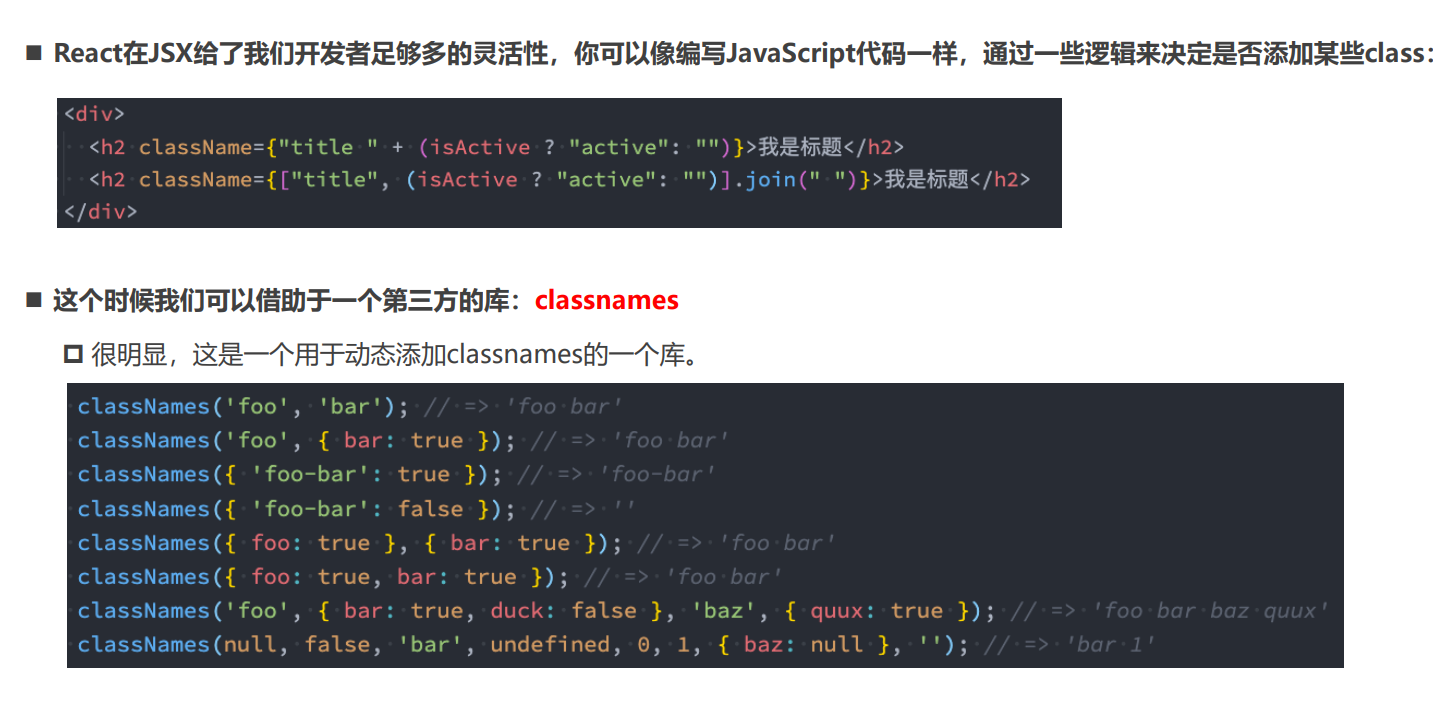
CSS in Js
CSS in Js是一种模式,其中CSS有javaScript生成而不是在外部文件中定义
- 传统的前端开发中,HTML、CSS、JavaScript通常分类
- React认为逻辑和UI是无法分离的,所以才会有了JSX的语法
- JSX是Html in Js,加上CSS in Js在完整的体现的逻辑和UI无法分离,因此React被称为All in JS
CSS in JS库:styled-components:
- CSS-in-JS使用JavaScript为CSS赋予一些能力,可以类似于CSS预处理器一样的样式嵌套、函数定义、逻辑复用、动态修改
- CSS预处理器也具备某些能力,但获取动态状态依然是一个不好处理的点
ES6标签模板字符串
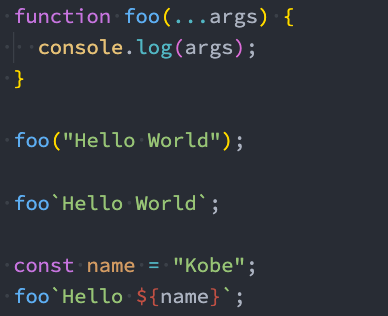
即函数可以通过字符串的方式来调用
- 第一个参数是数组,是被模块字符串拆分后的组合
- 后面的元素是一个个模块字符串传入的内容
- 注意是反引号
styled-components的使用
基本使用
jsx代码:
1
2
3
4
5
6
7
8
9
10
11
12
13
14
15
16
17
18
19
20
21
22
23
24
25
| import React from "react";
import { AppWrapper, StrongWrapper} from "./style";
class App extends React.PureComponent{
constructor(){
super()
}
render(){
return (
<AppWrapper>
<div className="container">
<span>哈哈哈</span>
<StrongWrapper>我是strong</StrongWrapper>
<div className="context">
<span>嘿嘿嘿</span>
</div>
<div className="context1">
<span>嗯嗯嗯</span>
</div>
</div>
</AppWrapper>
)
}
}
export default App
|
style.js代码:
1
2
3
4
5
6
7
8
9
10
11
12
13
14
15
16
17
18
19
20
21
22
23
24
| import styled from "styled-components";
export const AppWrapper = styled.div`
.container>span{
width:100%;
color: red;
}
.container{
.context1{
color: orange;
}
}
.container .context{
color: blue;
}
.container .context:hover{
color: #cccc;
}
&:hover{
text-decoration: line-through;
}
`
export const StrongWrapper =styled.strong`
color:skyblue
`
|
- 样式js的命名不能和组件名称相同,例如不能用App.js
- 可以像正常CSS一样编写CSS代码
- 可以用&来获取当前元素
- 可以通过设置styled.__来设置包裹的类型
- styled返回的是一个组件,可以按照组件的方法使用
props\attrs属性
- 获取props需要通过${}传入一个插值函数,props会作为该函数的参数;
- 这种方式可以有效的解决动态样式的问题
CSS代码:
1
2
3
4
5
6
7
8
9
10
11
12
| import styled from "styled-components";
export const AppWrapper = styled.div.attrs({
tcolor:props=>(props.color||"blue")
})`
.container{
width:100%;
color: ${props=>{
return props.tcolor
}};
}
`
|
jsx代码:
1
2
3
4
5
6
7
8
9
10
11
12
13
14
15
16
17
18
19
20
21
22
23
24
| import React from "react";
import { Children } from "react";
import { AppWrapper, StrongWrapper} from "./style";
class App extends React.PureComponent{
constructor(){
super()
this.state = {
checked:true
}
}
render(){
const {checked} = this.state
return (
<AppWrapper color={checked?"red":""}>
<div className="container">
<h2>哈哈哈</h2>
</div>
<button onClick={()=>{this.setState({checked:!this.state.checked})}}>改变颜色</button>
</AppWrapper>
)
}
}
export default App
|
注:
- tcolor不能与color同名,要不然会循环拿取
- tcolor传入的是一个函数,括号可以省略,会自动调用生成值
- tcolor:props=>(props.color||“blue”)是为了处理不传值时给定默认值,没有默认值时可以在下面直接取
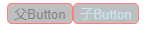
styled的继承
CSS代码:
1
2
3
4
5
6
7
8
9
10
11
12
13
| import styled from "styled-components";
export const AppWrapper = styled.div`
display: flex;
`
export const Button1 = styled.button`
border-radius: 5px;
border:1px solid red;
background-color: gray;
opacity: 0.5;
`
export const Button2 = styled(Button1)`
color: skyblue;
`
|
jsx代码:
1
2
3
4
5
6
7
8
9
10
11
12
13
14
15
16
17
18
| import React from "react";
import { Children } from "react";
import { AppWrapper, Button1, Button2} from "./style";
class App extends React.PureComponent{
constructor(){
super()
}
render(){
return (
<AppWrapper>
<Button1>父Button</Button1>
<Button2>子Button</Button2>
</AppWrapper>
)
}
}
export default App
|